Key takeaways
- Charge it fully before pairing. A low ring is the top cause of failed pairing.
- Wear it snug, sensor toward your palm, on the index or middle finger.
- Open QRing daily. Syncing only happens when the app is open.
- Recharge in the case every few days. Don’t wait for 0%, because battery readings are shaky when low.
- Rinse after salt or chlorine water, and keep it away from saunas and hot tubs.
On this page
First-time setup in 7 steps
Setting up the R07 takes about an hour, mostly charging time. Charge it, pair it with QRing, set your profile, and wear it overnight. By the next morning you’ll have your first full day and night of data.
- Unbox and check contents. Check the box for the ring and its charging case, plus any cable included, and confirm the size on the box matches your order.
- Charge first. Seat the ring in the charging case and connect the case to a USB power source until the battery shows full in the app.
- Install and pair. Install QRing, turn on Bluetooth, add the device in the app and select your ring while it sits close to your phone.
- Set your profile and goals. Enter height, weight and a daily step goal, then choose a heart-rate measurement interval.
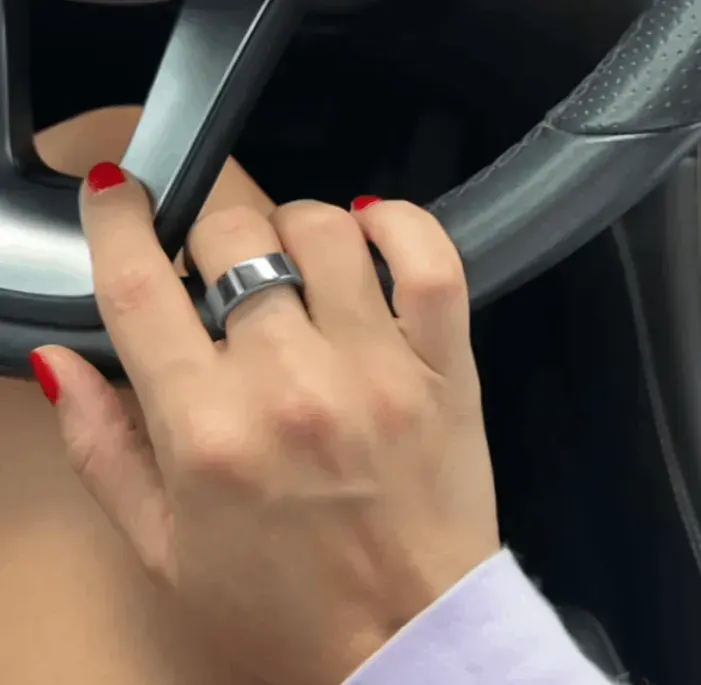
- Wear it correctly. Put the ring on your index or middle finger with the sensor bump on the palm side. It should be snug but comfortable.
- Sync every day. Open QRing once a day, ideally each morning, so it downloads sleep and activity data and you can check the battery.
- Recharge on a schedule. Drop the ring into its case every few days, for example while you shower, instead of waiting until it runs flat.
For a deeper look at each QRing screen and privacy settings, see our COLMI smart ring app guide.
Charging the ring and the case
The R07 charges in its 200 mAh case or on a magnetic cable. Seat the ring firmly so the contacts line up, and plug the case into any USB power source when the case itself runs low. Check the ring’s battery level in QRing, not by guessing.
| What | Capacity | Charges from |
|---|---|---|
| Ring (sizes 7–8) | 15 mAh | Case or magnetic cable |
| Ring (sizes 9–13) | 18 mAh | Case or magnetic cable |
| Charging case | 200 mAh | USB power source |
For reference, an independent tester charged the sibling R02 from 20% to 100% in about 80 minutes. Your times may differ. A few charging habits help:
- Keep contacts clean and dry. Wipe the ring and case contacts before charging.
- Charge the case once a week or so, so it’s ready when the ring needs it.
- Use a standard phone charger brick. No need for fast chargers.
- Don’t leave it in a hot car while charging or stored.
How to wear it for good readings
Wear the ring snug on your index or middle finger, sensor bump toward your palm, and keep it on the same finger every day. Finger choice, hand choice and fit are covered in depth in our how to wear a smart ring guide.
Battery-life tips
The biggest battery savers are a longer heart-rate interval, turning off measurements you don’t use, and keeping the ring away from heat. Charge on a routine rather than waiting for it to die, since low-battery readings can be unreliable.
- Lengthen the heart-rate interval in QRing settings if you don’t need frequent readings.
- Turn off extra background measurements you don’t look at. QRing users report faster drain when blood-oxygen monitoring runs.
- Avoid heat. Saunas, hot tubs and dashboards are hard on small batteries.
- Top up around 20–30%, not at zero.
- Keep firmware and app updated, since updates can include power fixes.
Cleaning and care
Clean the ring with lukewarm water and a drop of mild soap, then dry it with a soft cloth, especially around the sensor. Do this weekly, and always after pools, the ocean, sunscreen or lotion. Never use alcohol-heavy cleaners, abrasive pads or ultrasonic jewelry cleaners.
- Wipe the inner sensor window gently. Smudges can weaken readings.
- Dry the skin under the ring after washing hands to avoid irritation.
- Store it in its case when you take it off, so it doesn’t get scratched or lost.
Resetting the ring
If the ring freezes or won’t reconnect, first charge it, restart your phone’s Bluetooth, and force-close QRing. If that fails, remove the ring from QRing and your phone’s Bluetooth list, then pair it again. Use a factory reset from the device settings only as a last step.
- Charge the ring for at least 30 minutes.
- Turn Bluetooth off and on, and close QRing completely.
- Open QRing and try to connect again.
- Still stuck? In QRing, remove (unbind) the device, and forget it in your phone’s Bluetooth settings.
- Pair it again as a new device.
- Last resort: use the factory reset or restore option in the ring’s device settings in QRing. This wipes unsynced data, so sync first if you can.
Error fixes at a glance
Most COLMI ring “errors” are Bluetooth or battery issues. This table lists the problems owners report most, with the fix to try first.
| Problem | Try this first |
|---|---|
| Ring won’t charge | Clean contacts; reseat the ring; charge the case |
| Not syncing | Open QRing near the ring; allow background activity |
| Missing night of sleep | Check it was snug and charged; sync in the morning |
| Readings look wrong | Check fit and finger; compare weekly averages |
| Ring disappeared from app | Unbind, forget in Bluetooth, re-pair |
| Battery drains fast | Longer heart-rate interval; fewer background measurements |
More app-specific fixes are in our QRing troubleshooting table.
Safety tips
Take the ring off if your finger swells, tingles or turns red, and keep it away from young children and pets, since small rings are a choking risk. For when to remove it (lifting, saunas, power tools, medical scans), see our where not to wear a smart ring list.
When to see a doctor: the R07 is a wellness gadget, not a medical device. If you feel chest pain, shortness of breath, fainting, a racing or very slow heartbeat, or your readings keep looking unusual, talk to a doctor or call 911 in an emergency. Don’t wait for an app to confirm how you feel.
Frequently asked questions
How do I charge the COLMI R07?
Place the ring in its 200 mAh charging case, or on the magnetic cable, with the contacts lined up. Plug the case into a USB power source when the case itself is low.
How do I know when the COLMI ring is fully charged?
Open QRing and check the ring’s battery level on the device screen. The app reading is more reliable than guessing from charging time.
How do I reset a COLMI smart ring?
Charge it, restart Bluetooth, and re-open QRing. If that fails, unbind the ring in QRing, forget it in Bluetooth settings and pair again. A factory reset in the device settings is the last step.
Why is my COLMI ring not syncing?
QRing syncs only when the app is open and Bluetooth is on. Keep the ring close, open the app, and turn off battery optimization for QRing on Android.
How do I clean the COLMI ring?
Rinse it in lukewarm water with a drop of mild soap, gently wipe the sensor window, and dry it with a soft cloth. Avoid alcohol-heavy cleaners and abrasive pads.
Can I wear the COLMI ring while lifting weights?
It’s better to take it off. Bars and kettlebells can pinch your finger and scratch the ring, and heavy grip movement makes heart-rate readings noisy anyway.